handoff: the deliberate context reset
Version history
- v2.1Added approach comparison rationale (why ours won)
- v2Added hooks automation, thoughts/ directory structure
- v1Original manual /handoff command
part of my ai coding workflow. this is how i manage context across sessions without losing momentum.

v2: this post now covers automated handoffs using Claude Code hooks. the manual approach still works, but hooks make it seamless. skip to the automated way if you want the new hotness.
before building this, i tested three approaches to session continuity:
- claude's built-in
/compact- summarizes conversation in-memory - humanlayer's
/resume_handoff- comprehensive ticket-based handoff system - our custom
/handoff- lightweight file-based handoffs with hooks
our approach won. here's why.
the comparison
| Approach | Persistence | Auto-load | Validation | Task Sync | Complexity |
|---|---|---|---|---|---|
/compact | In-memory | N/A | None | No | None |
| HumanLayer | File | Via CLI | Heavy | TodoWrite | High |
| Ours | File | Via hooks | Light | TaskList | Medium |
/compact (6/10)
claude's built-in summarization. great for mid-session context management when you're hitting the context window limit.
the problem: it's ephemeral. gone when you close the terminal. no cross-session continuity. you start tomorrow re-explaining everything.
humanlayer's /resume_handoff (7/10)
impressive system from humanlayer.dev. ticket-based organization (ENG-XXXX), parallel verification tasks, heavy state validation, TodoWrite integration.
the problem: requires their CLI (humanlayer thoughts sync). assumes enterprise workflows with ticket systems. the validation process is multi-step and heavy. overkill for solo/small team projects.
our /handoff + /resume (8/10)
the sweet spot:
- persistent files - survives session boundaries
- native hooks - no external CLI dependencies
- TaskList integration - works with Claude Code's task system
- light validation - checks state without blocking
- brief by design - "compass, not novel" (~100-150 lines)
- git-aware - gathers actual repo state (branch, recent commits, changed files)
- human-readable - review/edit before next session
we borrowed the thoughts/ directory structure from humanlayer (great idea) and kept everything else native to claude code.
why ours won
- light enough to actually use — heavy systems get abandoned
- structured enough to be useful — template ensures nothing critical is missed
- persistent without infrastructure — just files, no external services
- git-aware and project-specific — knows about branches, commits, changed files
- native to claude code — uses hooks, TaskList, no external dependencies
context is king
everything an ai assistant does well, it does because of context. the CLAUDE.md file, the conversation history, the files it's read, the errors it's seen.. all of it compounds into understanding.
a fresh claude session knows nothing about your project. it's starting from scratch. but a claude session 50k tokens deep knows:
- your architectural decisions
- the bugs you've already fixed
- the patterns you prefer
- why that weird function exists
- what you tried that didn't work
that context is gold. it's the difference between "let me read through everything to understand" and "i know exactly where this goes."
the problem: context pollution
but context isn't free. every message adds tokens. every file read, every error, every "let me try that again".. it all accumulates.
and here's the thing: polluted context is worse than no context.
when your session is full of:
- failed approaches that led nowhere
- long stack traces from early debugging
- files you read but didn't need
- tangent conversations about things you decided not to do
..claude has to wade through all of it to find what matters. the signal-to-noise ratio tanks.
at 90k tokens, you notice it. responses get slower. claude starts referencing things you fixed hours ago. it forgets the current direction.
the compaction trap
claude code has automatic compaction. it summarizes older context when you're running out of room. sounds great in theory.
but by the time compaction kicks in, you've already lost. the summarization is lossy. nuance disappears. that subtle reason you didn't use redis? gone. the edge case in the cypher query? compressed away.
the conversation feels continuous but the understanding has holes.
worse: you don't notice until you hit a wall. "wait, we already discussed this" becomes "why doesn't it remember?"
the solution: deliberate handoff
instead of letting context degrade, i create a deliberate checkpoint. the /handoff command generates a handoff file. a compass for the next fresh session.
it's not a transcript. it's not a summary. it's actionable context. exactly what the next session needs to continue the work.
the key insight: start a fresh session with perfect context, instead of continuing a degraded one.
what's in a handoff
the structure is designed for quick parsing:
# Handoff: Client Lookup Enhancement

> **Date:** 2026-01-27
> **Session:** Implemented 3.17 Client Query → Add `region` + `notes` fields

---

## Context
Dunder Mifflin Infinity backend.
Implementing regional client lookup to replace keyword-based search.

---

## Just Completed
- Implemented `get_regional_clients()` query method with filters
- Added `region_code` parameter to `create_client_record()`
- Fixed SQL syntax and datetime conversion
- **29 tests pass**

### Key Files Changed
| File | Purpose |
|------|---------|
| `src/app/models/client.py` | NEW - `ClientResult` model |
| `src/app/services/sales.py` | Added `region_code` param |

---

## Next Up
**Add `region` and `notes` fields to Client record**

### Starting Point
1. Update DATABASE_SCHEMA.md
2. Update `src/app/services/sales.py:160`
3. Add tests

---

## Gotchas
1. **SQL ON CONFLICT** must come immediately after INSERT
2. **DateTime** needs conversion: `dt.isoformat()`

---

## Quick Commands
\`\`\`bash
uv run pytest tests/services/test_sales.py -v
\`\`\`

---

## References
- [Story 3.17](link) - Client query (DONE)
- [Story 5.5](link) - Regional lookup + filtering
why this works
1. just completed
not everything you did. just what matters for continuity. the next session doesn't need to know about the 4 approaches you tried that failed. it needs to know what succeeded.
2. key files changed
a table, not prose. the next session can immediately read these files and have the context it needs.
3. next up
the specific task to continue. not "keep working on the feature". the exact next step. "add reason and raw_text fields to SIGNALS edge."
4. starting point
line numbers, file paths, exact commands. eliminates the "where was i?" phase.
5. gotchas
this is the secret sauce. every session discovers things: syntax quirks, api behaviors, debugging tricks. without this section, the next session rediscovers them.
"cypher ON CREATE SET must come immediately after MERGE". this took 20 minutes to figure out. the next session gets it in one line.
6. quick commands
copy-paste ready. no "how do i run the tests again?"
when to handoff
i use /handoff when:
- i'm at 60-70k tokens. well before automatic compaction
- i'm switching tasks. different feature, different mental model
- i'm ending for the day. tomorrow is a fresh session anyway
- the conversation got messy. lots of backtracking, dead ends, tangents
the goal is to handoff while you still have good context, not after it's degraded.
v1: the manual way
the original /handoff command lives at .claude/commands/handoff.md:
# Handoff

Generate a concise handoff document for the next Claude session.

## Instructions

Create or update `HANDOFF.md` at the repo root with a brief compass:

1. **Gather context** by running:
   - `git status` - uncommitted changes
   - `git log --oneline -10` - recent commits
   - check for in-progress stories or tasks

2. **Write HANDOFF.md** with these sections:
   - context (1-2 sentences)
   - just completed (bullet list)
   - key files changed (table)
   - next up (specific task)
   - starting point (exact steps)
   - gotchas (traps to avoid)
   - quick commands (copy-paste ready)
   - references (links to docs)

3. **Keep it short.** compass, not novel. ~100-150 lines max.

4. **Be specific.** exact file paths, line numbers, working commands.

5. **Report back** with a one-liner to start the next session.
the key instruction: "this is a compass, not a novel."
this works. but it has a fatal flaw: you have to remember to use it. and i never did. sessions would end, context would vanish, and i'd start the next day re-explaining the same architecture decisions.
v2: the automated way
the fix: Claude Code hooks. three events you can tap into:
| Hook | When It Fires |
|---|---|
SessionStart | When you run claude |
SessionEnd | When you exit (Ctrl+C, /exit) |
PreCompact | Before auto-compact triggers |
hooks run shell scripts. they can output text that claude sees. but here's the key insight: hooks can't access conversation context. they're just shell scripts.
so the architecture is:
- hooks handle automation (triggers, reminders, loading files)
- claude generates the actual handoff content via
/handoff
the thoughts/ directory
thoughts/
├── CURRENT.md          # Symlink to active handoff
├── handoffs/           # Timestamped handoff files
│   ├── 2026-01-28-signal-migration.md
│   └── 2026-01-27-hds-refactor.md
├── plans/              # Implementation plans
├── research/           # Research notes
└── scratch/            # Temporary files (gitignored)
the CURRENT.md symlink is the magic. it points to whatever you're working on. hooks check this file.
why a whole directory structure?
handoffs/ - timestamped snapshots. you can grep through old ones when you forget how you solved something three weeks ago.
plans/ - longer implementation plans that span multiple sessions. the handoff references the plan, doesn't duplicate it.
research/ - notes from exploring APIs, reading docs. context that's useful but too verbose for a handoff.
scratch/ - gitignored. temporary files, test outputs.
the hooks configuration
in .claude/settings.json:
{
  "hooks": {
    "SessionStart": [
      {
        "hooks": [
          {
            "type": "command",
            "command": "\"$CLAUDE_PROJECT_DIR\"/.claude/hooks/load-handoff.sh",
            "timeout": 30
          }
        ]
      }
    ],
    "SessionEnd": [
      {
        "hooks": [
          {
            "type": "command",
            "command": "\"$CLAUDE_PROJECT_DIR\"/.claude/hooks/save-handoff.sh",
            "timeout": 30
          }
        ]
      }
    ],
    "PreCompact": [
      {
        "hooks": [
          {
            "type": "command",
            "command": "\"$CLAUDE_PROJECT_DIR\"/.claude/hooks/save-handoff.sh",
            "timeout": 30
          }
        ]
      }
    ]
  }
}
load-handoff.sh
#!/bin/bash
set -e

THOUGHTS_DIR="$CLAUDE_PROJECT_DIR/thoughts"
CURRENT_HANDOFF="$THOUGHTS_DIR/CURRENT.md"

# Check for CURRENT.md symlink/file first
if [ -f "$CURRENT_HANDOFF" ]; then
    # Only show if less than 24 hours old
    if [ "$(uname)" = "Darwin" ]; then
        FILE_AGE=$(( $(date +%s) - $(stat -f %m "$CURRENT_HANDOFF") ))
    else
        FILE_AGE=$(( $(date +%s) - $(stat -c %Y "$CURRENT_HANDOFF") ))
    fi

    # 86400 seconds = 24 hours
    if [ "$FILE_AGE" -lt 86400 ]; then
        echo "=== RESUMING FROM HANDOFF ==="
        echo ""
        cat "$CURRENT_HANDOFF"
        echo ""
        echo "=== END HANDOFF ==="
        exit 0
    fi
fi

# No recent handoff - silent start
exit 0
save-handoff.sh
#!/bin/bash

echo ""
echo "=== SESSION ENDING ==="
echo "If you have important context, run /handoff before exiting."
echo "This will save your context to thoughts/CURRENT.md"
echo ""
simple. the script just reminds you. claude does the actual work.
how it works end-to-end
session 1: working on signal migration
- do work for 2 hours
- get tired, run
/handoff - claude creates
thoughts/handoffs/2026-01-28_14-30_signal-migration.md - claude symlinks to
thoughts/CURRENT.md - exit session
session 2: next morning
- run
claudein the project load-handoff.shfires, outputs the handoff content- claude sees: "=== RESUMING FROM HANDOFF ===" + full context
- claude reads the context, picks up where we left off
- first message: "I see we were migrating signals to Firestore. Want to continue?"
session 3: forgot to handoff, auto-compact triggers
- working for a while, context gets long
- claude's auto-compact is about to trigger
save-handoff.shfires: "If you have important context, run /handoff before exiting"- i see the warning, run
/handoff - context saved before compact wipes it
what it looks like
running /handoff:
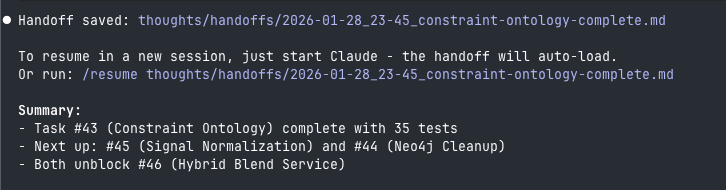
compact summary. shows where the file was saved and what's next.
starting a fresh session (or /clear):
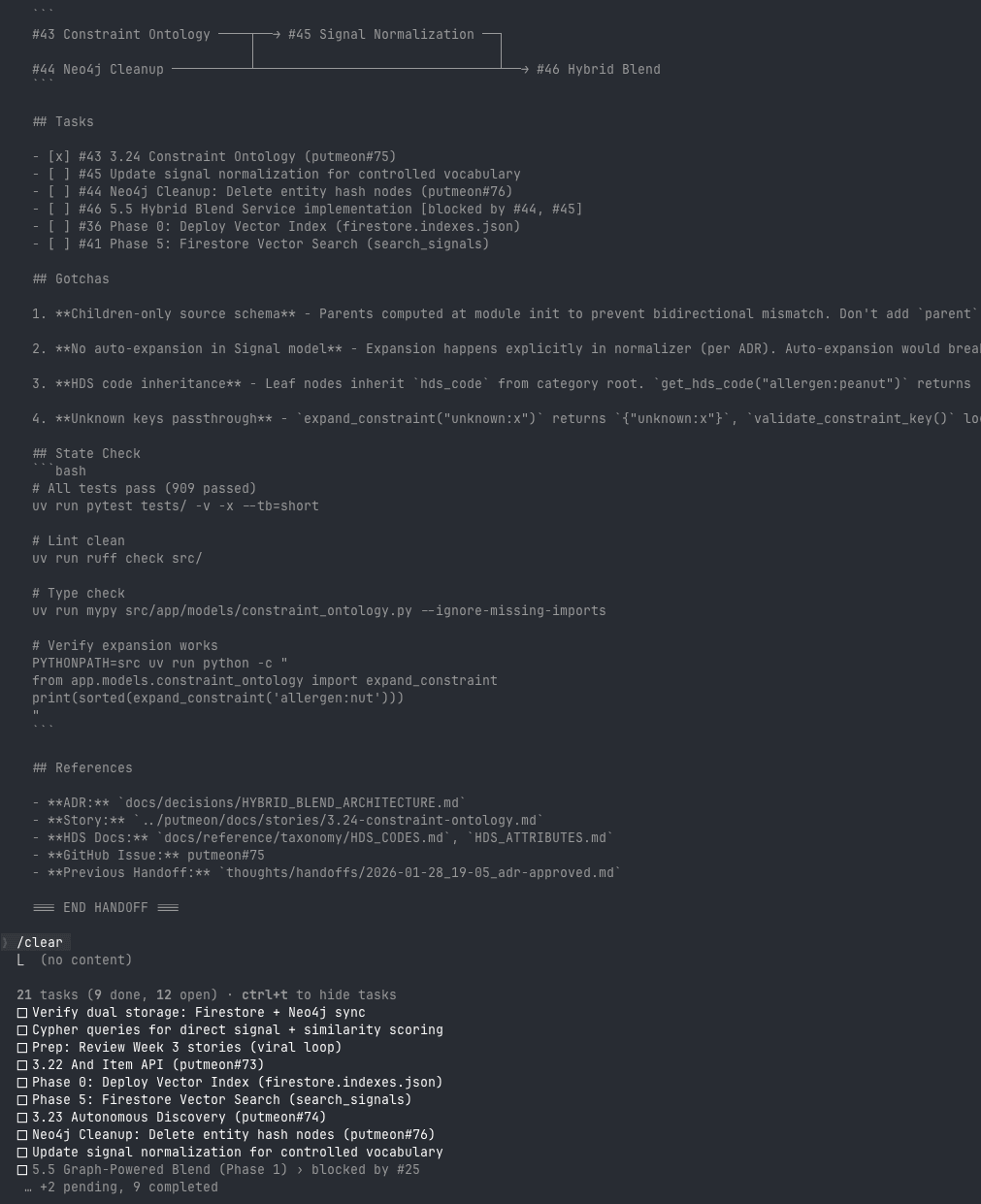
the hook fires before you type anything. full context restored. this is the magic.
v1 vs v2
| Feature | v1 manual | v2 hooks |
|---|---|---|
| Persistence | File | File |
| Cross-session | Yes | Yes |
| Auto-load | No | Yes |
| Reminder before exit | No | Yes |
| PreCompact warning | No | Yes |
| Directory structure | Single file | thoughts/ |
v1 works but requires discipline. v2 is the same thing, automated.
try it
v1 (manual)
- add the
/handoffcommand to.claude/commands/handoff.md - run
/handoffbefore ending sessions - start new sessions with "Read HANDOFF.md then [task]"
v2 (automated)
- create the directory structure:
mkdir -p thoughts/{handoffs,plans,research,scratch}
echo "*" > thoughts/scratch/.gitignore
echo "!.gitignore" >> thoughts/scratch/.gitignore
-
add hooks to
.claude/settings.json(see above) -
create the hook scripts in
.claude/hooks/ -
update
/handoffcommand to write tothoughts/handoffs/and symlinkCURRENT.md -
actually use it. the hooks will remind you.
the mental model
think of sessions like relay races:
without handoff: each runner starts from the beginning of the track, getting more tired as they run longer distances. by the end, they're stumbling.
with handoff: each runner starts fresh, but exactly where the last one stopped. the baton carries the context.
the context window isn't a limitation to fight against. it's a signal to work with. when it starts filling up, that's not a problem. it's a prompt to checkpoint and reset.
related
- my ai coding workflow. the full system
- vibecheck. auditing implementation against the plan
- multi-llm plan critique. pre-implementation validation
the difference between "i should do this" and "this happens automatically" is the difference between good intentions and actual behavior change. hooks bridge that gap.
context is king. but a king that's exhausted and confused isn't ruling anything. give your next session a fresh start with perfect context. that's the handoff.
< EOF